

The best Indian wedding presets depend on whether you edit RAW or JPEG, which Lightroom apps you use, and the light in your files. This guide compares six packs using their current official product information; Colour Store publishes this guide. We list our own packs alongside others and state what each product page does and does not confirm.
Which Colour Store pack fits my Lightroom Mobile workflow?
If you edit Indian wedding JPEGs on Android or iPhone, choose the Signature Collection. Its 34 XMP presets import directly into Lightroom Mobile. For camera RAW files, choose Rab Ne Bana Di Jodi. The Wedding Bundle includes both collections. RAW editing and custom profiles may require Lightroom Premium or additional setup.
Already used Colour Store on a wedding? Share your camera, file type and editing experience on our customer feedback page.
Best by use case
| Use case | Pack | Verified details | Lightroom Mobile support | Price shown | Product page |
|---|---|---|---|---|---|
| JPEG workflow | Colour Store Signature Collection | 34 Signature presets; intended for JPEG; XMP; Lightroom Mobile, Lightroom Classic 11+ and Camera Raw 14+. | Direct XMP import on Android and iPhone. | ₹6,300 | Signature product page |
| RAW workflow | Colour Store Rab Ne Bana Di Jodi | 34 RAW Lightroom presets; XMP; Lightroom Mobile, Lightroom Classic 11+ and Camera Raw 14+. | Direct XMP import on Android and iPhone. | ₹12,000 | Rab Ne Bana Di Jodi product page |
| Both RAW and JPEG | Colour Store Wedding Bundle | Combines Signature (JPEG) and Rab Ne Bana Di Jodi (RAW); XMP; Lightroom Mobile, Lightroom Classic 11+ and Camera Raw 14+. | Direct XMP import on Android and iPhone. | ₹15,000 | Wedding Bundle product page |
| Lowest listed price in this comparison | Zoom Designs Indian Wedding Lightroom Presets Pack | 50 XMP files; page lists RAW and JPEG, Lightroom Classic, CC and Mobile. | Mobile supported. Import method unspecified. | ₹299 | Zoom Designs product page |
| Desktop-to-mobile workflow | VIVAH Lightroom Preset | Two presets; seller says Mobile presets require Lightroom desktop for syncing; Classic 7.3+ and Camera Raw 10.4+. | Requires Lightroom desktop for syncing. | ₹4,999 | VIVAH product page |
| DNG and XMP options | Preset Gallery 2026 Indian Wedding Presets | 49 DNG and 49 XMP presets; page says compatible on mobile and PC. | Mobile supported. Import method unspecified. | ₹999 (₹5,999 crossed out) | Preset Gallery product page |
The comparison covers six distinct packs. Check the Lightroom Mobile column for each pack’s installation method. Prices are the amounts displayed when checked in November 2026; confirm the current product page before purchase.
Colour Store Signature Collection — JPEG workflow
Direct answer: Choose the Signature Collection if you edit JPEG wedding files and want the workflow Colour Store lists for Indian and South Asian weddings. The product page describes natural skin tones and lists 34 presets. The page shows ₹6,300 and specifies XMP files, Lightroom Mobile, Lightroom Classic 11 or later and Adobe Camera Raw 14 or later.
Details: The Signature page says the collection is intended for JPEG editing and lists weddings, bridal portraits, couple portraits, pre-wedding sessions, indoor ceremonies, receptions and outdoor portraits. Begin with a frame from the lighting group you want to edit, set exposure and white balance, then inspect face, neck and hands together. Look at red fabric and gold jewellery beside skin before syncing to similar frames. The page lists Lightroom Mobile (Android and iPhone) alongside Lightroom Classic and Camera Raw, but does not list a camera model list, so that point needs confirmation for your setup. See the current Signature product details.
Colour Store Rab Ne Bana Di Jodi — RAW workflow
Direct answer: Choose Rab Ne Bana Di Jodi when your wedding workflow is based on RAW files. Colour Store describes it as the RAW version of its Signature style and lists 34 RAW Lightroom presets. The page shows ₹12,000 and specifies XMP, Lightroom Mobile, Lightroom Classic 11 or later and Camera Raw 14 or later.
Details: The product page describes the pack for Indian wedding editing and advises adjusting exposure and white balance for each lighting group. Use a representative RAW frame to set a starting exposure and white balance, then check faces, bright clothing, red and gold details, and the stage lights in that group. Repeat the check when moving from daylight to indoor or reception light; do not assume one global adjustment fits the whole event. The page lists Lightroom Mobile (Android and iPhone) alongside Lightroom Classic and Camera Raw, and asks buyers to confirm camera-profile requirements. See the current Rab Ne Bana Di Jodi details.
Colour Store Wedding Bundle — combined RAW and JPEG workflows
Direct answer: Choose the Wedding Bundle if the same studio edits both JPEG and RAW wedding files. The official page says it combines the Signature JPEG collection and Rab Ne Bana Di Jodi RAW collection. It shows ₹15,000 and lists XMP files, Lightroom Mobile, Lightroom Classic 11 or later and Camera Raw 14 or later.
Details: The pack combines the two Colour Store workflows rather than presenting a separate file type. Keep the JPEG and RAW workflows distinct when selecting a preset, and check which collection is appropriate for each file before editing a mixed delivery. The product page names outdoor weddings, indoor rituals, receptions, portraits and pre-weddings, lists Lightroom Mobile (Android and iPhone) alongside Lightroom Classic and Camera Raw, and asks users to confirm camera-profile requirements for the included packs. See the current Wedding Bundle details.
VIVAH Lightroom Preset — Indian wedding use (desktop Lightroom required)
Direct answer: VIVAH is a product page specifically for Indian wedding photography and lists two Lightroom presets. It shows ₹4,999, names Lightroom Classic 7.3 or later and Camera Raw 10.4 or later, and says Mobile presets require desktop Lightroom for syncing.
Details: The seller describes VIVAH for wedding photographers and Indian wedding ceremonies, and its page includes a before-and-after comparison. The listed compatibility is useful if your workflow includes Lightroom Mobile, but the page does not name a file format. Check that format and your exact setup with the seller before you build a workflow around it. The page also describes outdoor wedding photography and skin tones; assess the actual result on your own files under the light you shoot. See the VIVAH product page.
Zoom Designs Indian Wedding Lightroom Presets Pack
Direct answer: This page lists a 50-file XMP pack for Indian wedding and pre-wedding photography and shows ₹299. It says the files work on RAW and JPEG images and lists Lightroom Classic, CC and Mobile.
Details: The official page names haldi, mehendi and reception photography among its use cases. It describes XMP files and a warm, cinematic look. Its detailed feature list names Lightroom Mobile, while another compatibility field says Photoshop and Lightroom PC. Check which apps are included for your intended workflow before purchase. For a wedding edit, try a few frames with different skin tones and lighting before applying adjustments across a full event. See the Zoom Designs product page.
Preset Gallery 2026 Indian Wedding Lightroom Presets
Direct answer: The Preset Gallery listing is for an Indian wedding preset pack and names 49 DNG presets and 49 XMP presets. It displays ₹999 with ₹5,999 crossed out and states compatibility with mobile and PC.
Details: The page does not specify Lightroom version requirements, so confirm the supported app version and how the files install before purchasing. The displayed price and compatibility can change; refer to the live page for current details. As with any preset, compare several frames from the same event and make exposure and white-balance adjustments before judging the colour. See the Preset Gallery product page.
Why Indian weddings need careful colour checks
Warm light, saturated clothes and mixed lighting can shift how a photograph renders. A preset is one starting point; exposure, white balance and local corrections still matter. Check people and coloured objects together rather than judging a single colour channel in isolation.
- Deeper, warmer skin can shift orange or muddy when HSL channels are pushed too far; check face, neck and hands together.
- Red, maroon and gold outfits, flowers and marigolds can reflect colour onto nearby skin; inspect both people and fabrics in the same frame.
- Stage lamps, tube lights, flash and coloured LEDs can mix in one image; assess each lighting group separately.
Haldi
Answer: Keep yellow decor and turmeric lively while checking that faces do not become uniformly yellow. Compare people with the marigolds and clothing in the same frame.
Start with a frame under the ceremony’s main light, set white balance, then inspect skin beside yellow fabric and flowers. If one subject is in shade while another is under warm light, do not assume a single global correction will suit both. Review a short sequence before syncing settings, and preserve differences between skin tones instead of pushing every face toward one colour.
Mehendi
Answer: Watch green foliage, henna and coloured decor for reflections on skin. Hands and faces may sit under different light, so check them separately.
Review a close frame that shows hands and a wider scene that includes the decor. Check for green or yellow casts on skin, and look at the henna colour without flattening surrounding fabrics. If the light changes across the event, make a new adjustment for that group rather than forcing every frame to match the first image.
Sangeet
Answer: Stage lighting can vary from one moment to the next. Inspect faces and red or magenta clothing under each lighting change before applying a synced edit.
Compare a frame under the main stage light, a frame in ambient light and a flash-lit frame if those occur. Watch highlights on skin and jewellery, and check whether coloured LEDs create a cast on faces. A preset cannot make different light sources identical; use local corrections when a global white-balance change improves one subject but shifts another.
Ceremony
Answer: Ceremony photographs may move between window light, shade, warm indoor fixtures and flash. Set exposure and white balance for the specific lighting group.
Inspect faces, white garments, red fabrics and gold details together. Bright highlights can lose texture if exposure is raised to brighten a shaded face, so check both ends of the tonal range. When a sequence moves from outdoor portraits into an indoor ritual, treat those as separate starting points and review matched moments from each camera body.
Reception
Answer: Reception light often combines dim ambient conditions with flash or coloured stage light. Assess ambient and flash frames separately before syncing.
Check skin, clothing and jewellery in a representative frame from each light source. A neutral-looking wall does not guarantee that faces under coloured LEDs will look neutral. Make a consistent starting edit for each group, then check a range of subjects and outfits before exporting the sequence. The product pages list some reception use, but do not provide comparable low-light test results across these packs.
How to choose
- RAW or JPEG: Pick the file workflow stated on the product page. Signature is listed for JPEG editing; Rab Ne Bana Di Jodi is listed for RAW; the Wedding Bundle combines the two.
- Camera: Check camera-profile requirements for your exact model. The Colour Store product pages ask users to confirm these requirements.
- Mobile or desktop: Match the official compatibility statement to your setup. The Colour Store pages list Lightroom Mobile, Lightroom Classic and Camera Raw versions, as do VIVAH, Zoom Designs and Preset Gallery.
- Daylight or reception: Test daylight, indoor and reception files from your own weddings. Set exposure and white balance by lighting group before syncing.
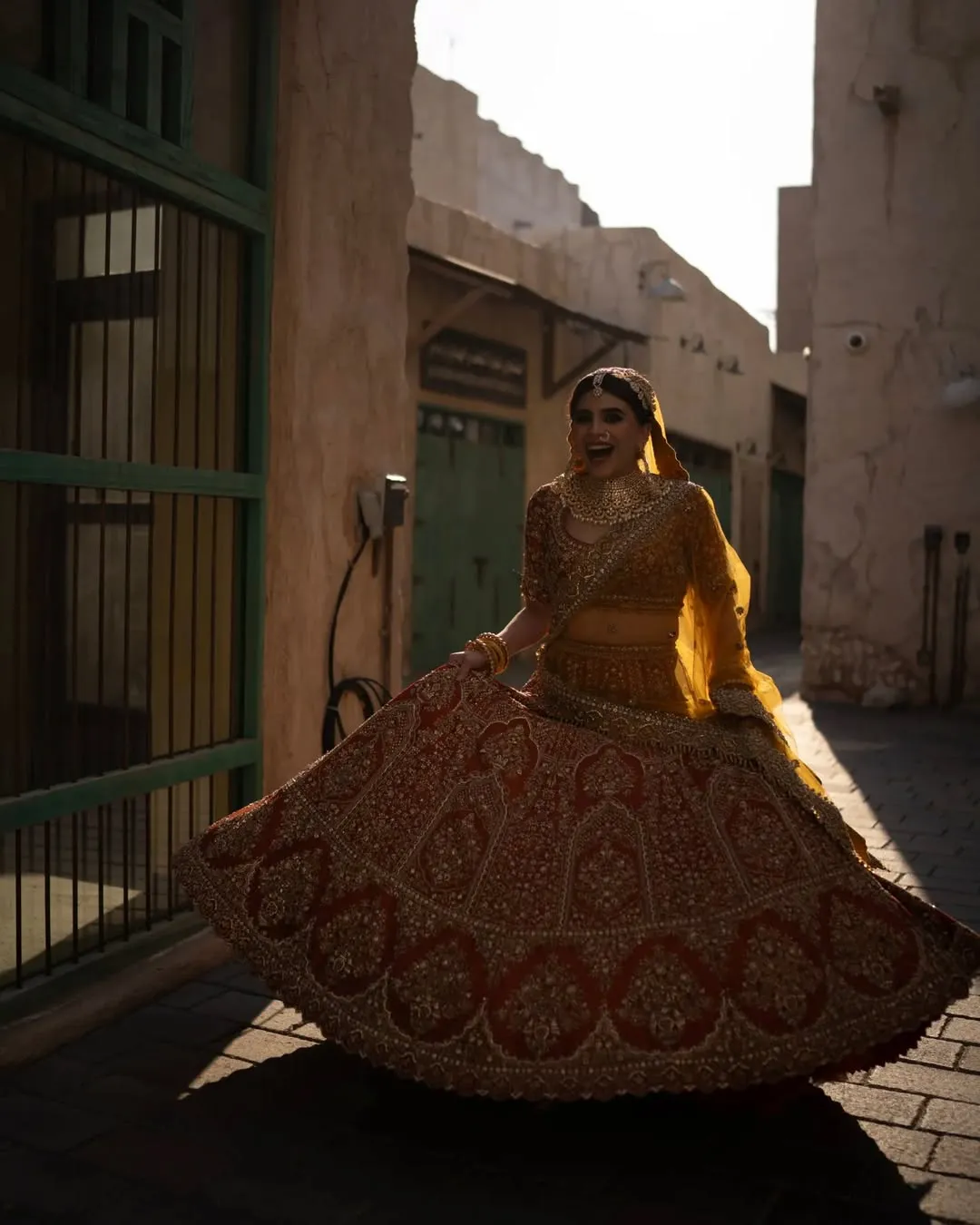
Before
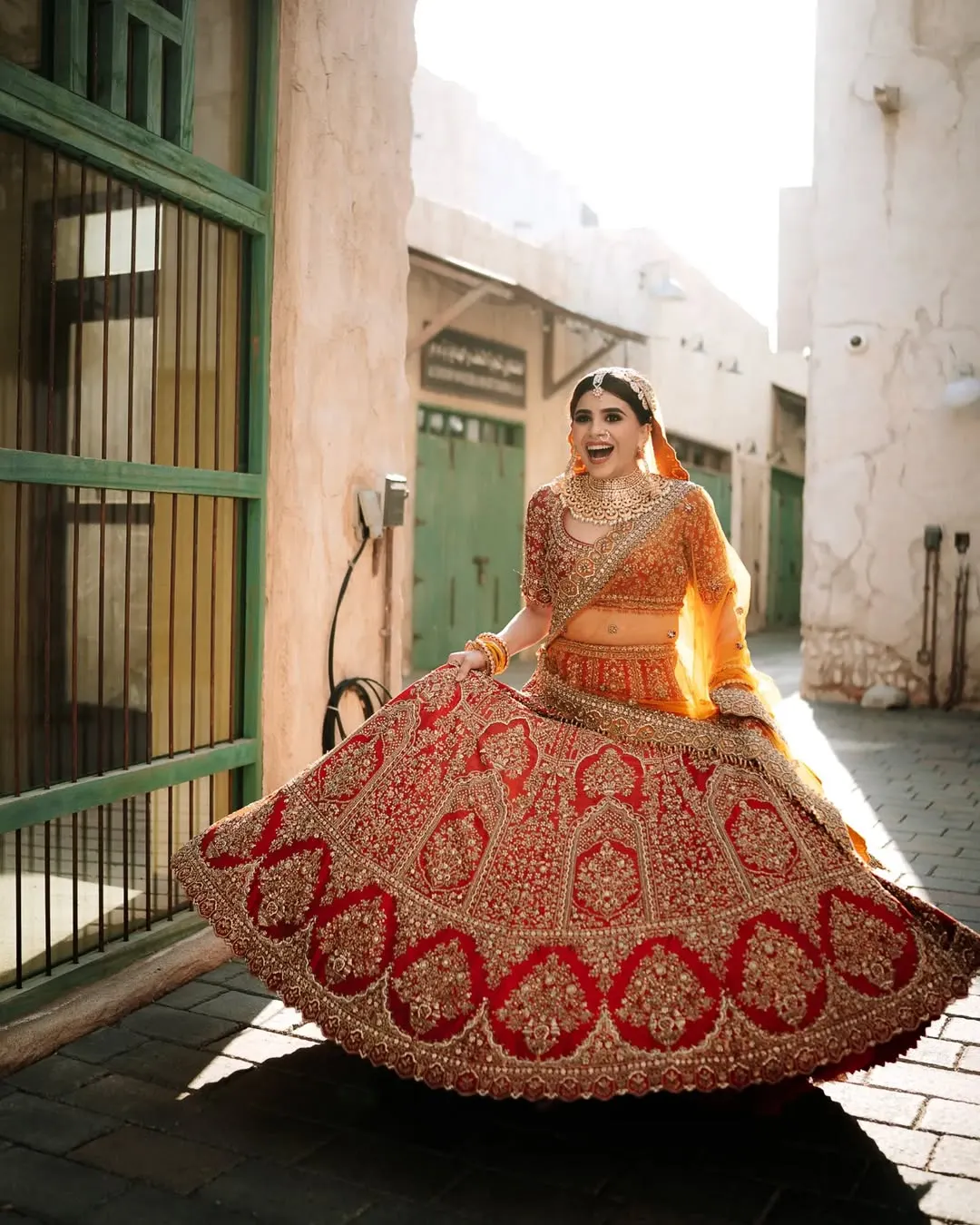
After
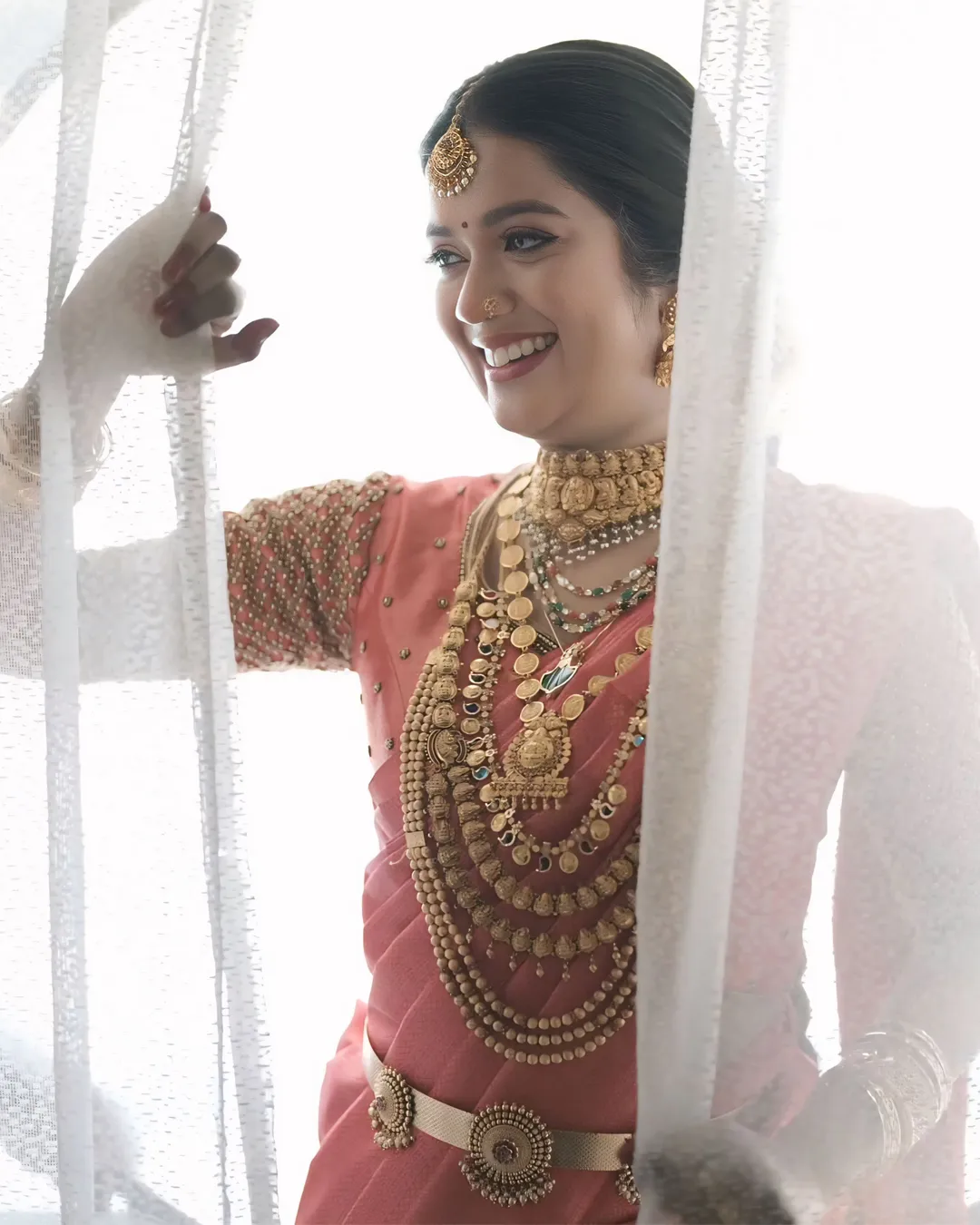
Before
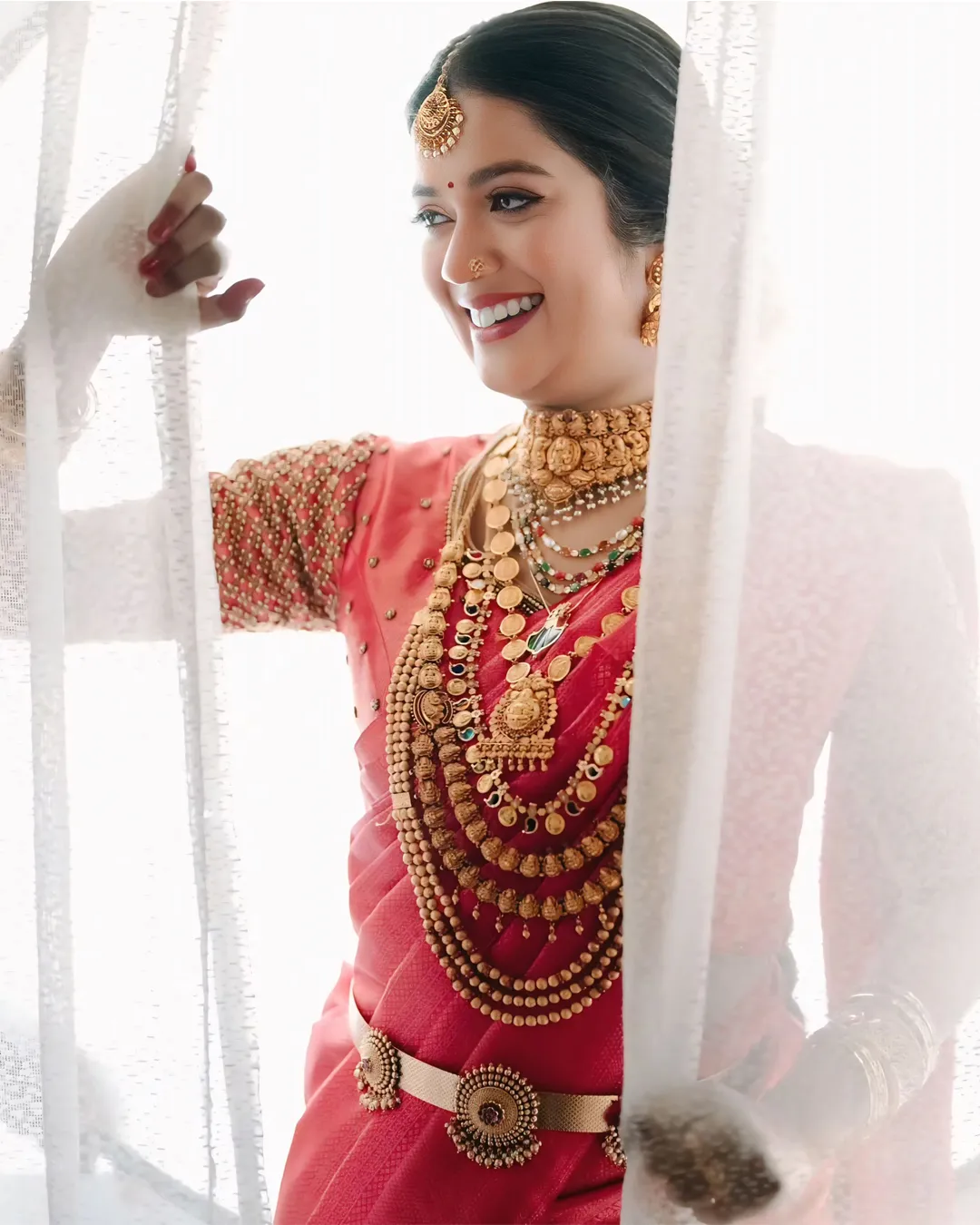
After
Frequently asked questions
What are the best presets for Indian weddings?
The right pack depends on your file type, software and the lighting in your photographs. This guide compares six packs using information published on their official product pages.
Do these presets suit Indian skin tones?
The Signature page explicitly describes Indian and South Asian wedding photography and natural skin tones; other pages describe their intended use in different ways. Test the pack on your own files and review each person under the actual light.
Do these packs work on Lightroom Mobile?
Yes, for Colour Store. The Signature, Rab Ne Bana Di Jodi and Wedding Bundle pages list Lightroom Mobile (Android and iPhone) alongside Lightroom Classic and Camera Raw. VIVAH says Mobile presets require desktop Lightroom for syncing, and Zoom Designs and Preset Gallery also state Mobile compatibility.
Which pack is best for reception and night photography?
Several pages mention receptions, but the pages do not provide a shared low-light comparison. Test a representative reception frame and check skin, saturated clothing and mixed lighting before applying an edit to a sequence.
Will one preset work on every photo?
No preset can be assumed to fit every exposure, camera and light source without adjustment. Treat it as a starting point and refine exposure and white balance for each lighting group.
Which camera and format do I need?
There is no single camera requirement for all six products. Check the chosen product page for RAW or JPEG workflow, named software versions and camera-profile requirements, and ask the seller about details the page does not state.
Last updated: November 20, 2026. Prices and features checked against official product pages.
Explore the Colour Store shop.
[…] the Rab Ne Bana Di Jodi RAW pack, the Signature collection for JPEG editing, our Indian wedding preset guide, and the story behind Colour Store. Product contents and requirements can vary by collection, so […]
[…] and whether you shoot RAW or JPEG and we will help you check compatibility. You can also read our guide to six preset packs compared, see how to edit each Indian wedding ceremony in Lightroom or learn the story behind Colour […]